Transforming even more colors from Confluence to SharePoint!
Outdated: SharePoint has real table cell colors now
The part about table cell colors in this post is no longer true. In 2025 Microsoft brought a new page format to SharePoint, and with it real background colors for table cells and merged cells. WikiTraccs writes those colors directly into the cells now. The workaround with the colored marker blocks that this post describes is gone.
The text colors and the highlight colors below are still correct.
Read the current state here:
- Harnessing the New SharePoint Page Format: the page format that brought cell background colors and merged cells
The latest release of WikiTraccs contains multiple improvements with regard to colors.
Text colors, the newly introduced text highlight colors (Confluence Cloud) and table cell colors got some attention.
Note
SharePoint does not support all colors that are available in Confluence. So WikiTraccs tries its best to map to a color that exists in SharePoint Online.What has SharePoint Online to offer in terms of colors?
The SharePoint Online color palette for text looks like this:
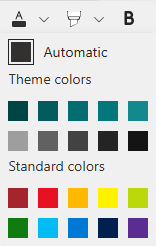
Note that we cannot really use the theme colors as they change, depending on the theme. That leaves us with 11 text colors.
The SharePoint Online color palette for highlights looks like this:
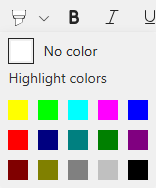
That’s a whopping 15 colors.
What about table cell colors? SharePoint does not have those. We’ll see how WikiTraccs handles that further down. (Not true any more, see the box at the top.)
Text Color Transformation
Those are the 21 text colors available (at least at the moment) in Confluence Cloud:
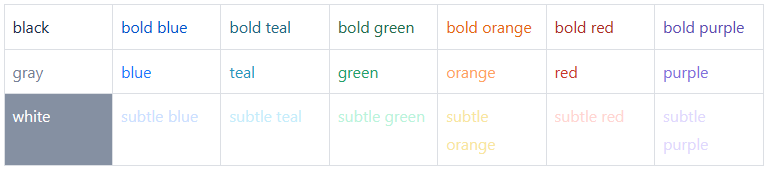
Text Colors in Confluence Cloud
WikiTraccs maps those colors to the visually nearest available text color in SharePoint Online:

Text Colors in SharePoint Online
Here’s another example from Confluence Server, which has 40 colors to offer:
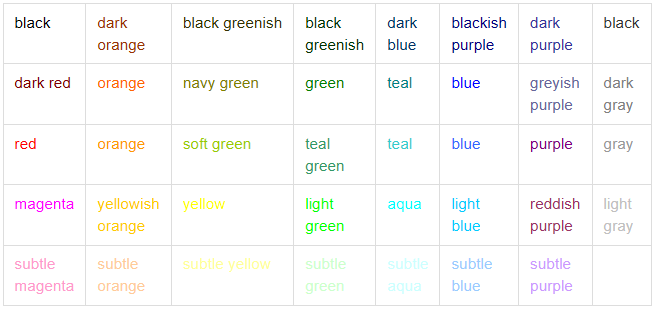
Text Colors in Confluence Server 6
This is how it’s transformed to SharePoint:
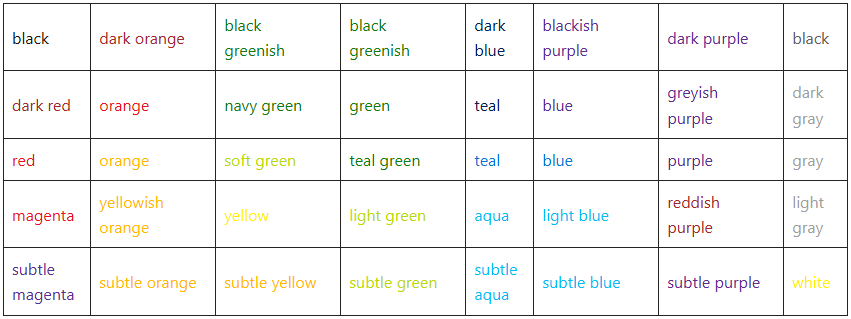
Text Colors in SharePoint Online
Highlight Color Transformation (new)
Now for the new highlight colors in Confluence Cloud:

Highlights in Confluence Cloud
Those map pretty well to SharePoint Online in terms of available colors:

Highlights in SharePoint Online
SharePoint’s highlight colors are way darker than in Confluence which makes black text hard to read for the teal and purple highlights.
Table Cell Color Transformation
Here’s how table cell colors look in Confluence Cloud:
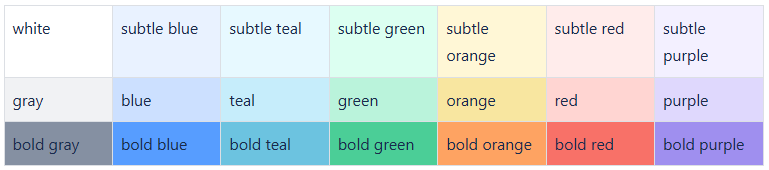
Table cell colors in Confluence Cloud
SharePoint does not support setting colors for table cells. Maybe that’s coming in the future, but so far I did not spot anything related on the roadmap. (Let me know if you see or hear something!)
Update: it did come. Microsoft added cell background colors with the new page format in 2025, and the workaround below is history.
WikiTraccs is using a workaround to at least indicate in SharePoint, that the table cell was colored in Confluence.

"Table cell colors" in SharePoint Online
Here’s another sample from Confluence Server 6, which has less cell colors to offer:
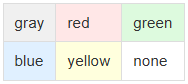
Table cell colors in Confluence Server 6
This is how it’s transformed to SharePoint:

Table cell colors in Confluence Server 6
In both instances, WikiTraccs adds a block of colored spaces to each formerly colored table cell, serving as a “color marker”. And again, it is restricted to colors that SharePoint has to offer.
What did change in the latest WikiTraccs release?
The latest release handles text highlight colors that have been introduced by Atlassian in June 2024.
Furthermore, the color markers for table cells now support the full range of text colors available in SharePoint. Previously, WikiTraccs used colored emoji squares like 🟩 as marker - but those only come in very few colors.
And last but not least: the algorithm to calculate the visual distance between colors has been improved. This maps Confluence colors even more closely to their SharePoint equivalents.