Table Size Optimization
Release v1.30 of WikiTraccs introduces a new way to measure and optimize table sizes.
Let’s look at one example that shows the reasoning behind this new feature.
Consider the following narrow table in Confluence:
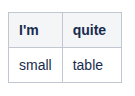
Migrating this to SharePoint without table size optimization so far produced the following wide SharePoint table:

The reason for that size difference is that the table in Confluence carries no explicit size information (at least until you manually resize the columns), and the browser decides how wide a table is (based on Confluence’s internal styling). For SharePoint, styling is different and the table becomes page-wide.
How could WikiTraccs learn about the real tables size, if this information is only available in the browser?
The answer is browser-based table size optimization: WikiTraccs copies each table to a real browser. The browser decides about the size of each table cell, table column, and ultimately the table itself. Now WikiTraccs just needs to read those numbers from the browser and apply that to the table in SharePoint.
After applying table sizes gotten from the browser, the result for above sample table looks like this in SharePoint:
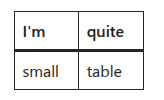
Much better, right? This benefits especially larger table, tables with images, and nested tables.
The results are so promising that table size optimization is enabled by default.
If you see any issues with calculated table sizes, please report those and consider turning table size optimization off; you can do that in the WikiTraccs Misc settings, using the Skip table size optimization setting.