Confluence Authentication Improvements
WikiTraccs provides different ways to authenticate with Confluence. You’ll find an overview here: Authenticating with Confluence.
One of the ways to authenticate with Confluence is Interactive Authentication. Using this, a browser window will open when you start the migration, and you’ll authenticate with Confluence using a migration account. WikiTraccs will then take over the user session and add the session cookies to all requests it issues to Confluence.
Interactive Authentication (Session Cookies) vs. Personal Access Token
Why not always use personal access tokens (PATs) to access Confluence, you might ask.
Firstly, the use of PATs might be prohibited when multi-factor authentication (MFA) is enforced. So, using a PAT from the internal company network might work, but using a PAT from outside the internal network (e.g. from your home office without a VPN) might fail. This is most common with Confluence on-premises.
Secondly, PATs only allow access to endpoints officially supported by Atlassian. There are certain cases where WikiTraccs has to use internal or undocumented endpoints to migrate content that would otherwise not be accessible. This is most common with Confluence Cloud.
At the time of writing this, one example of missing endpoints is the “dynamic data card”, whose content cannot be retrieved via official APIs. I asked about that in 2024, but so far there doesn’t seem to be a solution yet. Using interactive authentication and session cookies, WikiTraccs can use the same endpoints that the Confluence browser UI uses.
Interactive Authentication Cookie Refresh
One caveat to interactive authentication and reusing session cookies is that those cookies might have a limited lifetime. They might need regular refreshes. This usually happens when you navigate Confluence in the browser.
Since WikiTraccs v1.32.2, cookie refresh is supported. This feature is optional and needs to be turned on when required. Note that over a period of about 3 years while serving hundreds of customers, there was only one case where such a refresh caused issues due to sessions timing out during the migration. That’s why the setting is considered optional and located in the Misc section of the Transformation Settings dialog:
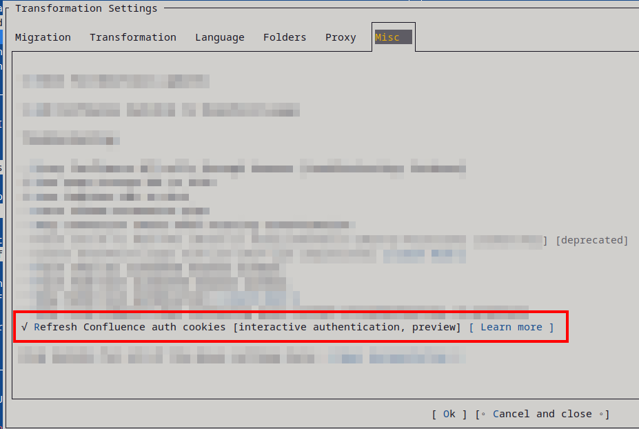
When this option is checked, you’ll notice a difference during the migration. One additional browser window will stay open that periodically refreshes Confluence in the browser. WikiTraccs will look for changed cookies and take them over to use them when issuing requests to Confluence.
The feature is currently marked as a preview, as I’d like to get feedback about its usefulness and usability.
Known issue: When finishing or stopping a migration run, WikiTraccs sometimes fails to close the browser window it uses to keep the cookies fresh. If that happens, close it manually, or try closing all browser windows and restarting WikiTraccs (before starting a new migration run).