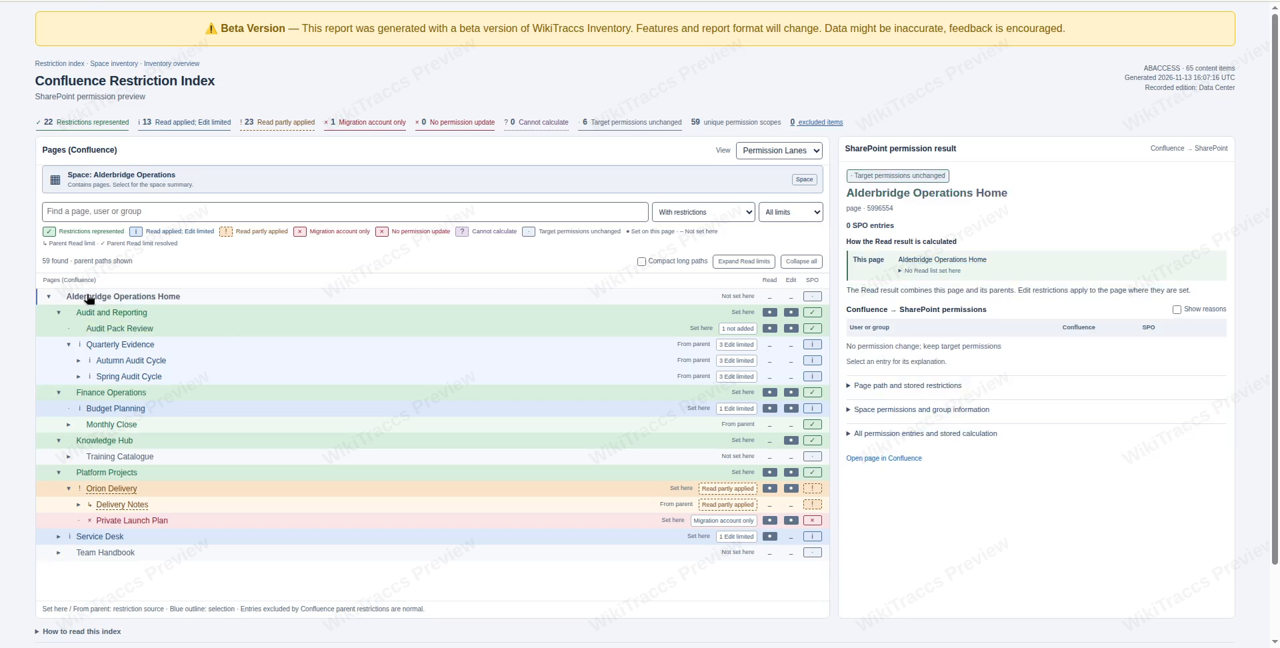
The Confluence Restriction Index shows page restrictions and the permissions WikiTraccs would apply in SharePoint. It includes Read restrictions inherited from parent pages. You can generate the report from a Confluence inventory before migrating content.
The video shows how to connect to Confluence, scan a space and open the report. The examples explain why some user entries are left out in SharePoint and why different groups can prevent WikiTraccs from reproducing all Read access.
Follow the written instructions below or use the chapter times to find a part of the video.
Related documentation
For setup, see Activate Inventory Mode. Confluence Page Restrictions vs. SharePoint Permission Inheritance explains the permission models. See Known Issues and limitations for the limits of permission migration.AI Note
This article was generated from the video transcript. Chapter times refer to the edited video.Available from WikiTraccs v2.0.31
Use WikiTraccs v2.0.31 or later to collect inventory data and generate this report. The report layout and labels can change.A brief introduction to Confluence page restrictions
In Confluence, Read restrictions on parent pages also limit access to their children. SharePoint pages do not inherit permissions from parent pages. WikiTraccs must calculate permissions for each page. The report shows that result and explains where WikiTraccs cannot reproduce the Confluence restrictions.
▶️ Watch from the start · start 0:00 · duration 1:18
Collect restrictions with Inventory Mode
Inventory Mode scans Confluence and saves the collected data in a local database. It processes the pages without uploading them to SharePoint. You do not need a SharePoint connection for the scan.
▶️ Watch this part · start 1:18 · duration 0:51
The demo space
The fictional Alderbridge Operations space contains pages with and without their own restrictions. Pages without their own restrictions can inherit Read restrictions from parent pages. The demo includes individual users and different groups at several levels.
▶️ Watch this part · start 2:09 · duration 0:30
Configure Confluence and the report folder
In WikiTraccs.GUI, select Tools, then Inventory Mode. Enter the Confluence base address, choose the authentication method and select a local output folder. Use Test Confluence connection, then Discover spaces to load the list of spaces.
▶️ Watch this part · start 2:39 · duration 1:41
Select the space and run the inventory
Use Open space selector to select the spaces to scan, then save the selection. Update content count is optional; it shows how many pages the account can see. Click Start inventory. The demo uses Skip attachment download verification because it focuses on page restrictions. Wait for the scan to finish.
▶️ Watch this part · start 4:20 · duration 2:19
Generate the inventory reports
Click Generate reports from existing inventory to create HTML reports from the local database. Open Inventory.html from the report folder in a browser, then open the report for your space. To refresh the saved Confluence data, run the inventory again.
▶️ Watch this part · start 6:39 · duration 1:28
Open the Confluence Restriction Index
In the space report, select Open Confluence Restriction Index. You will see the page hierarchy and a SharePoint permission preview. A page without its own restrictions can still need separate SharePoint permissions because a parent page limits who can read it.
▶️ Watch this part · start 8:07 · duration 0:31
Read the hierarchy and the permission result
In Permission Lanes, the Read and Edit columns show restrictions set directly on each page. Select a page to see How the Read result is calculated, followed by the Confluence → SharePoint permissions table. A child page’s readers must also meet its parents’ Read restrictions. Edit restrictions apply only to the page where they are set. Expand a table entry to read its explanation.
▶️ Watch this part · start 8:38 · duration 1:33
A user entry below a parent restriction
On Audit Pack Review, Hugo is in the page’s Read list but not in the parent’s Read list. WikiTraccs does not add a separate Read entry for him in SharePoint. The table shows Not added. He could still have access through a group that remains in the result. The page can remain green because this follows Confluence’s parent restrictions.
▶️ Watch this part · start 10:11 · duration 1:06
Group restrictions that cannot be combined
On Orion Delivery, the parent and child use different Read groups. Both lists include ab-source-operators, so WikiTraccs retains that group. For the other groups, it cannot calculate which users belong to both the parent and child group lists. The report shows Read partly applied and names the entries left out of the SharePoint result.
▶️ Watch this part · start 11:17 · duration 1:16
What the preview can calculate
The preview uses saved inventory data. It assumes valid SharePoint user and group mappings, unchanged Confluence data and one target site per space. It does not verify live group membership or the permissions already set in SharePoint. Opening the report does not change access in either system.
▶️ Watch this part · start 12:33 · duration 0:40
Apply permissions after the content migration
Migrate the content first and prepare the user and group mappings. Then enable permission migration in the migration settings and start a separate run. WikiTraccs applies permissions to the migrated pages using the same calculation rules as the preview. See Mapping principals and migrating permissions for the instructions.
▶️ Watch this part · start 13:13 · duration 0:48