Include/Exclude Filters
The Waves & filters field in WikiTraccs.GUI supports both wave clauses and filter clauses.
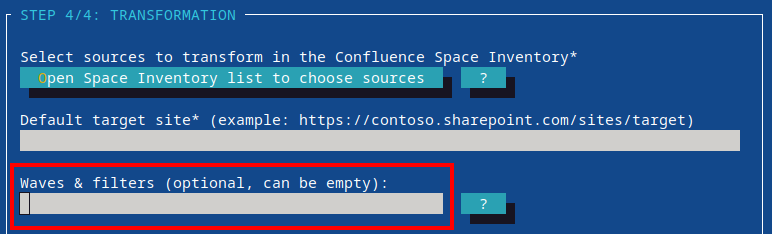
Use waves to mark selectors from the Space Inventory for the next migration run.
Use filters to include or exclude specific spaces or content items on-the-fly, without having to modify any selectors. This is great for testing and iterating quickly on specific pages.
Note
If you have not read about the general wave syntax yet, start with Migration Waves.How filters work together with waves
Waves and filters are evaluated together, but they have different jobs:
- Waves choose selectors from the Space Inventory you want to run.
- Filters include or exclude specific spaces or content IDs, on-the-fly, withoug having to modify selectors in the Space Inventory.
The following example selects the pilot and review waves for migration, as well as the HR space, while excluding the page with ID 12345 from the migration run.
pilot review +space.key:HR -id:12345
Supported filter clauses
The following filter clauses are supported:
| Clause | Meaning | Example |
|---|---|---|
+id: | Include one content ID | +id:12345 |
-id: | Exclude one content ID | -id:12345 |
+ids: | Include multiple content IDs | +ids:12345,67890 |
-ids: | Exclude multiple content IDs | -ids:12345,67890 |
+id!: | Force one content ID to be enqueued; this will force-overwrite the SharePoint page | +id!:12345 |
+ids!: | Force multiple content IDs to be enqueued; this will force-overwrite the SharePoint pages | +ids!:12345,67890 |
+space.key: | Include one space by space key | +space.key:HR |
-space.key: | Exclude one space by space key | -space.key:ARCHIVE |
+space.keys: | Include multiple spaces by space key | +space.keys:HR,FIN,IT |
-space.keys: | Exclude multiple spaces by space key | -space.keys:ARCHIVE,LEGACY |
+space.id: | Include one space by space ID | +space.id:123456 |
-space.id: | Exclude one space by space ID | -space.id:123456 |
+space.ids: | Include multiple spaces by space ID | +space.ids:123,456,789 |
-space.ids: | Exclude multiple spaces by space ID | -space.ids:123,456,789 |
The +id! and +ids! filter variants force existing (previously migrated) SharePoint pages to be overwritten.
The +id and +ids filter variants (without !) behave “normally”:
- if the page already exists in SharePoint and did not change in Confluence, the page is skipped in the migration run
- if the page already exists in SharePoint and did change in Confluence, the page is either skipped, or overwritten, depending on the Update outdated SharePoint pages setting
Content IDs and content types
Content ID filters can optionally include a content type.
Example:
+id:12345;#blogpost
Use this in Confluence Cloud to explicitly address non-page content types like blog posts.
Examples
Migrate one named wave, but exclude one space:
pilot -space.key:ARCHIVE
Migrate two waves and include one specific content item:
1 2 +id:12345
Migrate one wave and include several specific pages:
pilot +ids:12345,67890,77777
Migrate one wave and force one specific page to be overwritten in SharePoint:
pilot +id!:12345
Migrate one wave and explicitly include several spaces:
pilot +space.keys:HR,FIN,IT
Order matters
When multiple filter clauses could match the same item, the first matching filter clause wins.
Because of that, put the more specific filter first.
Example:
pilot +id:12345 -space.key:ARCHIVE
In this example, content ID 12345 stays included even if it belongs to space ARCHIVE, because the specific include clause comes before the broader exclude clause.
If you reverse the order, the exclude clause wins:
pilot -space.key:ARCHIVE +id:12345
Separators
You can separate clauses with spaces, commas, or a mix of both.
Examples:
pilot review +space.key:HR
pilot,review,+space.key:HR
pilot, review +space.key:HR
Inside grouped filter clauses such as +ids: or +space.keys:, the individual values are separated with commas.
Typical usage patterns
- run a wave and add a few specific pages:
pilot +ids:12345,67890 - run a wave and force specific pages to be overwritten:
pilot +id!:12345 - re-migrate a single page:
dummywave +id!:12345(dummywavedoesn’t exist)
For the general wave syntax and examples like wave ranges or wildcards, see Migration Waves.