This is the multi-page printable view of this section. Click here to print.
Using WikiTraccs.GUI
1 - Source Configuration
Confluence Base Address
Enter the Confluence base URL into the Confluence base address field.
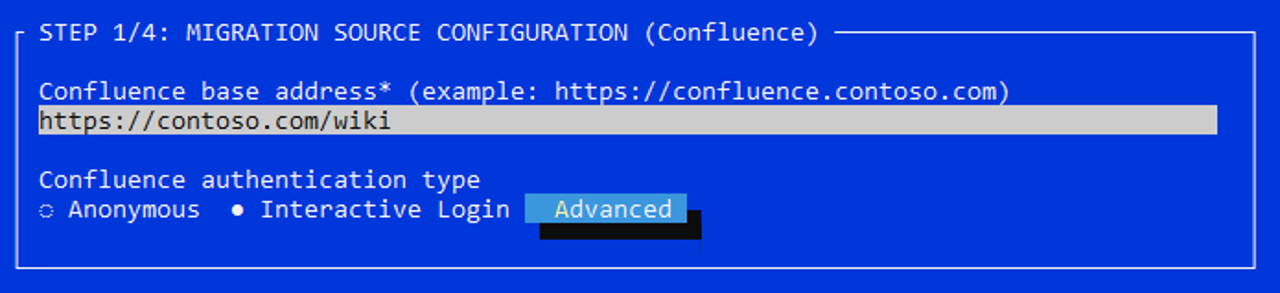
Source configuration
Note that the base URL might differ from the one the end user sees in the browser address bar.
How to manually check that the base URL is correct?
You can check that the base URL is correct by appending /rest/api/user/current and opening the resulting URL in the browser.
Example: Log in to Confluence. Then, assuming the base URL is https://contoso.com/wiki, open https://contoso.com/wiki/rest/api/user/current in the browser. It should show you information about your current user.
Confluence Authentication Type
Choose Anonymous if Confluence is accessible without a logged in user.
Note
Anonymous authentication can be used to migrate content like pages and attachments. What most likely won’t work is migrating permissions and gathering user and group information for user and group mappings. Choose another authentication type instead.Choose Interactive Login to log in interactively. When starting the migration, WikiTraccs will open Confluence in a browser where you can log in. Then, WikiTraccs takes the session cookies from this browser session and uses them when accessing Confluence. To Confluence this looks like the user that was used to log in is accessing the content.
Well-known session cookies
By default WikiTraccs looks for the well-known session cookies with name JSESSIONID, and cloud.session.token. Use the advanced settings only to configure additional cookie names.Advanced Settings
Choose the Advanced button to open the advanced settings dialog.
Additional Mandatory Cookie Names
In the Additional mandatory cookie names input, enter the names of additional cookies WikiTraccs should use to authenticate with Confluence. Separate multiple names by semicolon ;.
SSO Cookies
Some SSO solutions create cookies with names like Contoso_SSO. Enter those names in the Additional mandatory cookie names input.WikiTraccs treats these cookie names as mandatory. It checks their presence when testing the Confluence connection and the test fails if any of them cannot be found. This applies regardless of whether the Copy all browser cookies option is enabled.
Copy All Browser Cookies
Note: This setting is available as of WikiTraccs v1.32.49.
Enable the Copy all browser cookies checkbox to have WikiTraccs copy all cookies from the interactive login browser session, not just well-known session cookies and additional mandatory ones.
This can help when required cookies are difficult to identify by name, unknown, or to work around issues introduced by changes in cookie availability by vendors (Atlassian, marketplace vendors).