You might see nodes in the tree that say Page unavailable (or inaccessible page in older WikiPakk versions), like here:
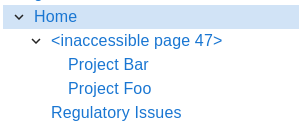
"Inaccessible page" in WikiPakk v2.10.0 and older

"Page unavailable" in WikiPakk starting with release v2.11.0
Where do those unavailable pages come from?
There are two sources of “unavailable pages”:
- deleted pages, and
- pages that the current user is not allowed to see due to broken permission inheritance on those pages
We’ll look at both cases below.
Deleted Pages
Deleting pages can make tree nodes show the Page unavailable placeholder.
Consider the following page tree:

Note the Projects page that has two child pages: Project Bar and Project Foo.
Now we delete the Projects page (that has the SharePoint item ID 47):
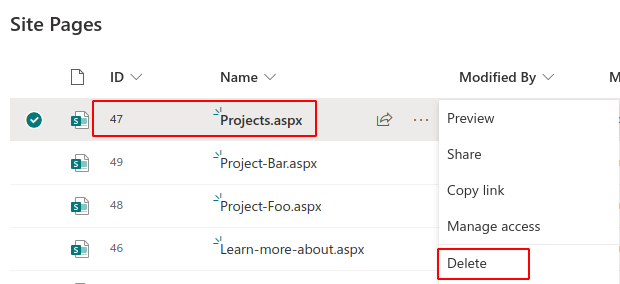
The tree now cannot get information about that page anymore. However, it still knows where the page used to be in the hierarchy of pages.
To maintain the configured hierarchy of pages, the tree shows a placeholder Page unavailable (47) where the page used to be:
The child pages are still being shown at the correct position.
If we restore the Projects page from the recycle bin the tree will again show its title and link to the page:
Note that WikiPakk cannot know if a page has been deleted or if a page is not available due to missing permissions.
Pages with Unique Permissions
Consider the following page tree:
What happens if a user cannot access the Projects page? This happens when the page had its permission hierarchy broken, unique permissions set, and the current user is not allowed to view the page.
For a user without access to the page, the tree will look like this:
Other users might have access, so the page tree will look differently for them.
Note
WikiPakk cannot know if a page is not accessible due to missing permissions, or due to a page having been deleted.SharePoint Works Differently than Confluence
If you know the page tree from Atlassian Confluence, you won’t know this issue of unavailable pages in the page tree.
In Confluence, if you are not permitted to access a page, you also cannot access its child pages.
In Confluence, if a page is deleted, the child pages won’t exist anymore.
Pages work differently in SharePoint.
In SharePoint, when deleting a page, its child pages in the Site Pages library and in the WikiPakk page tree still exist.
In SharePoint, when restricting access to a page, child pages might still be accessible for the current user.
Thus WikiPakk has to cope with a situation where in the midst of the page tree certain pages might be inaccessible.
Those pages will be represented as unavailable page in the page tree.
Handling Unavailable Pages
There are some strategies to handle those pages that are shown as unavailable.
Remove Those Pages via Context Menu
Note: this option is available as of WikiPakk 2.5.1. Learn how to update.
Use the mouse to hover over the unavailable page. Click the three dots to open the context menu. Click Remove from tree.
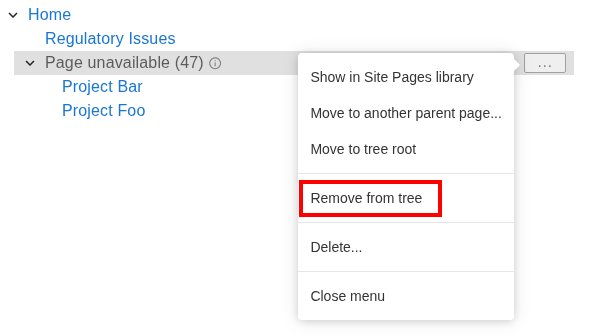
This removes hierarchy information for this page from the WikiPakk hierarchy table.
Children of this page node will remain in the tree and will be moved one level up.
The resulting tree looks like this:

Delete a Subtree of (Unavailable) Pages
Note: this option is available as of WikiPakk 2.11.0. Learn how to update.
If you see multiple pages being unavailable and nested in a subtree, or you just want to clean house, you can delete a whole subtree of pages:
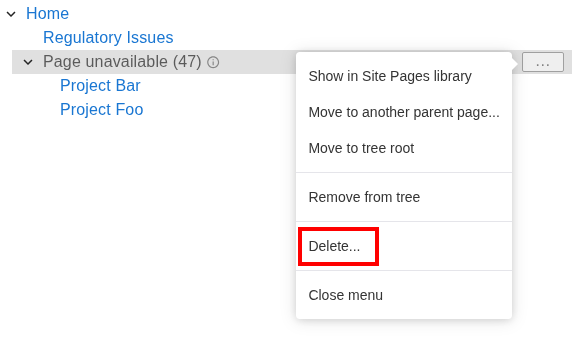
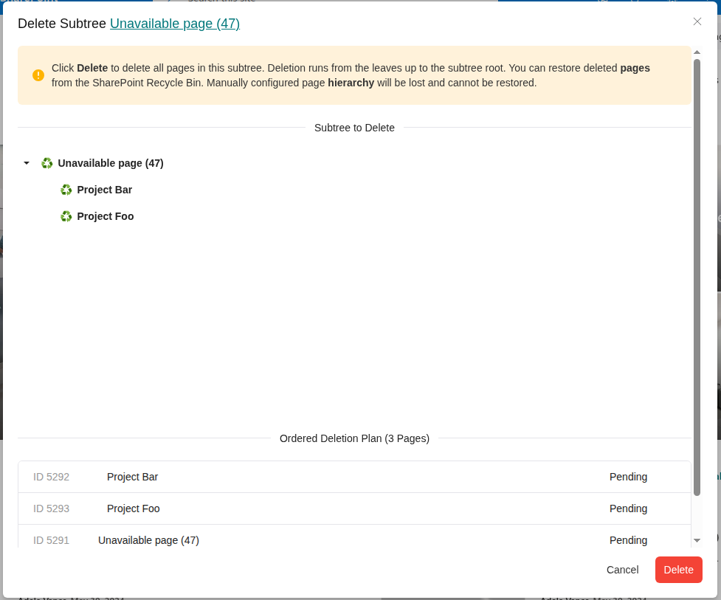
Click Delete… to open the Delete Subtree dialog:
Note
Clicking Delete will delete pages as well. It is different from the Remove from tree option, which will just remove a single unavailable node from the tree.Review the list of pages (both available and unavailable) that will be deleted. Clicking Delete will delete available pages as well as hierarchy information for shown pages.
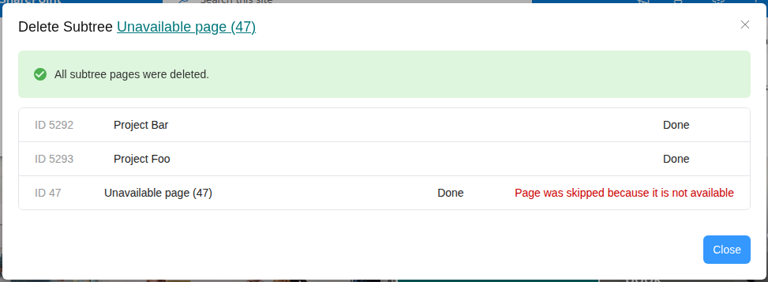
In our sample, clicking Delete deletes the following:
- Page Project Bar, including hierarchy information
- Page Project Foo, including hierarchy information
- Hierarchy information for unavailable page 47; there is no page to delete, as we already did that earlier
Move Unavailable Pages to a Dedicated Node
Use the WikiPakk page tree editor web part to move the unavailable page away:
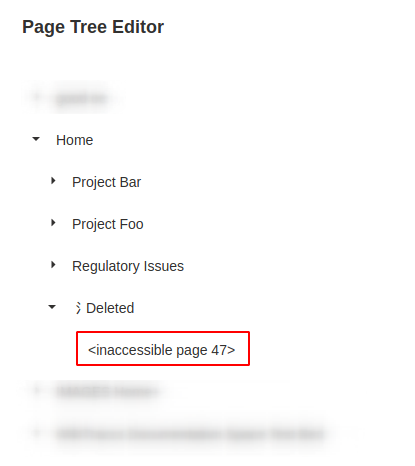
Note: the Deleted node in above image is a dummy page that has been created to serve as parent for unavailable page nodes.
Out of sight, out of mind.
If the unavailable page has child pages, you might want to move those to another parent node. In our sample those are the Project Bar and Project Foo pages, which have been moved to Home.
Note
WikiPakk automatically hides unavailable page nodes if those don’t have any children and are true tree leafs. So, after moving unavailable notes to a dedicated parent, they might disappear, which is the expected behavior.Advanced: Manually Delete Hierarchy Information for Unavailable Pages
You can also make the unavailable pages disappear by manually deleting their hierarchy information from the hierarchy list.
Note
Deleting hierarchy information is what the Remove from tree three-dot menu option does behind the scenes.WikiTraccs stores hierarchy information for pages in a hidden list. This list exists in every site WikiPakk has been added to.
Open WikiPakk’s hidden hierarchy list by appending Lists/WikiTraccsPageTree to the SharePoint site root address, like so: https://contoso.sharepoint.com/sites/pagetreedemo/Lists/WikiTraccsPageTree.
Build this root address for your site and enter it into the browser address bar.
Locate the unavailable page ID in the WtPId column, here 47.
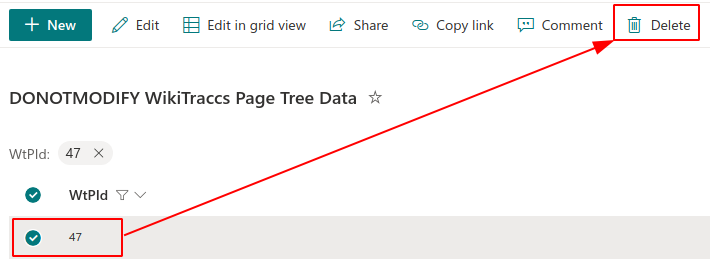
Delete the list item.
The Page unavailable (47) node is now gone from the tree.
Usability Outlook
There are features currently being worked on that will improve handling for deleted pages:
- ✅ done:
manual option to remove unavailable page nodes from the tree via their context menu - detection of deleted pages by looking in the recycle bin - this would allow removing some of the unavailable page nodes automatically